

The Halfword launch post left one thing for a post of its own: how its Android screens were checked without an emulator. This is that post.
Quick recap: Halfword is written once in Swift, and Skip Lite translates it into Kotlin for Android. Every test runs twice, as Swift and as the Kotlin it became. That covers the rules, the word packs and the saved games, but not what the screens look like. For that you run the app on Android: on a phone, or on the emulator.
I went with neither: Halfword's Android screens are drawn on the JVM, on my Mac, by a unit test. Here's why, how, and what the pictures caught.
The emulator
Let me get this off my chest first. Things I have said about the Android emulator, verbatim:
Android simulator is shame.
android simulator is abominable
Android deserves all hate it gets simply due to their sdks
The emulator had shown its manners on day one: the Android 16 emulator was too loaded to install the instrumented tests and answered "Can't find service: package". So no test has ever run on Android's own SQLite. Robolectric runs the Kotlin tests on the JVM anyway, so that could wait.
The next day my Mac kernel-panicked. It's an M2 with 16 GB. The panic was a watchdog timeout, with the memory compressor at "100% of segments limit". At that moment four builds were running in four worktrees at once, each with Swift and Xcode on one side and Gradle for the Kotlin side on the other, and the Android emulator was running on top. My diagnosis afterwards:
java was butchering both cpu and ram usage
So I paused Android. iOS shipped, and Android waited. Then I turned it back on ("start working on Android milestone - simple porting") with one wish: "if you have a way of rendering the UI without a simulator it'd be great".
There is a way.
The tests already run on Android. Sort of.
Skip's own Android tests don't need a device. By default they run under Robolectric, which runs the real Android framework classes on a desktop JVM and stands in for the hardware. When Android came back, all 721 tests passed in both columns, Swift and Kotlin, up to the app model playing a whole evening of games, after two fixes to the tests, none to the app.
So the transpiled app already runs under Robolectric. Robolectric's native graphics mode draws with Android's own Skia on the host, and Roborazzi saves the screen as a PNG. Put together, that's one JUnit test in the Android app module that:
- boots the app's real
MainActivity, the sameMain.kta phone runs, with Compose and SkipUI underneath; - on a pretend Pixel 7 (412 × 915 dp at 420 dpi, so density 2.625, dark mode);
- opens a screen, lets the app run for a moment, and saves the picture.
No emulator, no adb, no APK to install. One Gradle run.
How it works
The app already had 114 fixtures: named states such as the vote mid-count, Mr. White's guess or a cascade of eliminations, which a debug build opens straight from launch. On iOS a script starts the simulator with HALFWORD_FIXTURE=round-voting and takes a screenshot. On Android, the same script writes a launch file into the app's files/ folder with adb shell run-as, for an emulator.
The render does the same thing, minus adb. Condensed from the test, FixtureShots:
@RunWith(AndroidJUnit4::class)
@GraphicsMode(GraphicsMode.Mode.NATIVE)
@Config(qualifiers = "w412dp-h915dp-normal-long-notround-port-night-420dpi-keyshidden-nonav")
class FixtureShots {
    private fun draw(fixture: String, lang: String, file: File): String? {
        // Pick the screen the way the emulator script does: a launch file in files/.
        File(folder, LaunchOptions.fileName).writeText(
            "${LaunchOptions.fixtureKey}=$fixture\n${LaunchOptions.languageKey}=$lang\n")
        HalfwordRootView.forgetLaunch()   // every picture shares one process

        val looper = shadowOf(Looper.getMainLooper())
        val activity = Robolectric.buildActivity(MainActivity::class.java).setup()
        try {
            var waited = 0L
            while (!ready.exists() && waited < FIRST_FRAME_LIMIT_MS) {  // until the fixture is up,
                step(looper); waited += FRAME_MS                         // 20 s of app time at most
            }
            …
            var settled = 0L
            while (settled < settleMs) { step(looper); settled += FRAME_MS }  // then 1.5 s of app time
            captureScreenRoboImage(file)                                       // every window, alerts too
            …
        } finally {
            activity.pause().stop().destroy()
        }
    }
}
Two small pieces of app code help: the app writes a "ready" file once the fixture is up, which the screenshot script already polled for, and HalfwordRootView.forgetLaunch() drops the launch the process remembered, since all 456 pictures share one JVM. Both are debug-only doors: another Robolectric test starts the real activity as a release build with a launch file in place, and checks that it's ignored.
The clock is mine. Robolectric's main looper only moves when the test moves it. So the test moves it 16 ms at a time, one frame, until the fixture is on screen, then 1.5 more seconds of app time, the screenshot script's settle time. The sprites, the turn timer ("0:29") and the elimination's reveal end up exactly where they would be 1.5 s in, and nobody waits 1.5 seconds.
That was the plan, anyway. Two things had to be done by hand: the layout pass a phone's draw does every frame, and a clock that gives the same picture every run.
A phone draws every frame. Robolectric doesn't.
The first pictures had the top bar and the buttons, and nothing in between. Every scrolling list was blank: Home's rows, the vote, the results.
Compose measures and places a node that only asked for a redraw at the start of drawing the window (dispatchDraw). A phone draws every frame that changed. Robolectric never draws between pictures, so the content of every GeometryReader was composed and never placed, and every ScreenScroll (the app's scrolling frame) drew blank. The fix is to do the phone's first step by hand, on every window, so alerts are included:
private fun layOut() {
    for (root in windowRoots()) visit(root)
}

private fun visit(view: View) {
    if (view is RootForTest) view.measureAndLayoutForTest()
    if (view is ViewGroup) for (i in 0 until view.childCount) visit(view.getChildAt(i))
}

/// Every window's root view: WindowManagerGlobal's list, by reflection (it's hidden API).
private fun windowRoots(): List<View> {
    val global = Class.forName("android.view.WindowManagerGlobal")
    val instance = global.getMethod("getInstance").invoke(null)
    val field = global.getDeclaredField("mViews").apply { isAccessible = true }
    return (field.get(instance) as List<*>).filterIsInstance<View>()
}
Same picture, every run
Then the pictures stopped agreeing with themselves. From one run to the next, a sprite was a frame off in one or two of the 114 English pictures, and in three to seven with every core busy. A view's .task starts on a background thread and hops to the main one, and whatever it posts is stamped with the clock as it stands when the thread gets there. Robolectric's idleFor ran a whole stretch of tasks at once, so whether a sprite's tick landed before or after a frame depended on how fast the threads ran.
Now the main looper runs one task at a time, the clock moves only between tasks, and between two the test waits until kotlinx.coroutines' scheduler is quiet: nothing queued, no CPU permit taken, no blocking task. That's internal API, read by reflection. The worker threads' states alone weren't enough, because a woken worker looks parked until the OS schedules it.
/// One frame (16 ms) of app time, one main-thread task at a time.
private fun step(looper: ShadowLooper) {
    val end = SystemClock.uptimeMillis() + FRAME_MS
    while (true) {
        settle(looper)   // lay out every window, wait until the coroutine pool is quiet
        val next = looper.nextScheduledTaskTime.toMillis()
        if (next == 0L || next > end) break
        looper.runOneTask()
    }
    settle(looper)
    val rest = end - SystemClock.uptimeMillis()
    if (rest > 0L) ShadowSystemClock.advanceBy(Duration.ofMillis(rest))
}
One more: the first activity of a run is drawn and thrown away. The first render of a process loads classes and starts the coroutine threads, slowly enough to put a sprite a frame late.
After that, three runs of all 114 English pictures came out byte for byte the same. It got faster too, with no fixed sleeps left: all 456 pictures went from 3 min 11 s to 2 min 19 s.
A picture the render can't vouch for fails the run, with a <name>.failed saying why: its ready file names another fixture (a stale launch), or a wait gave up ("unsettled"). And the script unsets the four launch keys (HALFWORD_FIXTURE, HALFWORD_LANG, …) before Gradle, and the test refuses to draw if one is still set. The app lets them win over the launch file, so an exported HALFWORD_LANG=de would otherwise put every picture in German under an English name. Each was checked by breaking it on purpose.
The Gradle part
The app module's unit tests needed what Skip's generated module builds give theirs, plus a few flags:
android {
    testOptions { unitTests { isIncludeAndroidResources = true } }  // Micro 5 lives in res/font
}

dependencies {   // condensed from the app module's build.gradle.kts, Skip's catalog aliases spelled out
    testImplementation("org.robolectric:robolectric:4.16.1")
    testImplementation("androidx.test:core:1.7.0")       // ApplicationProvider
    testImplementation("androidx.test.ext:junit:1.3.0")  // AndroidJUnit4
    testImplementation("io.github.takahirom.roborazzi:roborazzi:1.76.0")
    testImplementation("net.java.dev.jna:jna:5.19.1")    // skip-sql reaches SQLite through JNA: the desktop jar
    testImplementation("org.ow2.asm:asm:9.10")           // Robolectric's own ASM can't read JDK 26 classes
}

tasks.withType<Test>().configureEach {
    // What to draw and where: the script's -Phalfword.shots.* become the test's system properties.
    listOf("fixtures", "langs", "out", "devices", "theme", "settle", "fontScale").forEach { key ->
        val name = "halfword.shots.$key"
        project.findProperty(name)?.let { systemProperty(name, it.toString()) }
    }
    systemProperty("robolectric.graphicsMode", "NATIVE")
    systemProperty("roborazzi.test.record", "true")  // no Roborazzi plugin, nothing to compare
    maxHeapSize = "2g"
}
- The desktop JNA jar. skip-sql reaches SQLite through JNA, and with the Android AAR alone it failed with "Could not initialize class com.sun.jna.Native".
- ASM 9.10. Robolectric's bundled ASM can't read JDK 26's classes: "Unsupported class file major version 70".
isIncludeAndroidResources, or no Micro 5: the pixel font is an app resource, and SkipUI silently falls back to the default sans serif.roborazzi.test.record: Roborazzi without its Gradle plugin, recording only. There's nothing to diff against; the pictures get looked at.- The
halfword.shots.*loop. A-Pproperty stays with Gradle; the test JVM sees only what the build hands it as a system property. Without the loop the script's fixture list never arrives, and the test skips itself. -Pkotlin.incremental=false. An incremental compile of Skip's included build failed with 30 errors like "Cannot access 'class CascadeState': it is internal in file", reproducibly, after a one-line doc-comment edit. Cause unknown. It has to be a-Pflag:gradle.propertiesdoesn't reach the included build.-Pkotlin.compiler.execution.strategy=in-process: no Kotlin daemon left behind, and the script stops Gradle's afterwards. On a 16 GB Mac, a leftover JVM is the enemy.-Pandroid.onlyEnableUnitTestForTheTestedBuildType=false, not for the render but for the release-build test above: AGP 9.2 makes unit tests for the tested build type only, so:app:testReleaseUnitTestdoesn't exist without it.
The render's flags are wrapped in a shell script, android-shots.sh, which waits (up to 10 minutes) until at least 25% of memory is free before it starts Gradle. My rule since the panic: at most two heavy builds at once, and Gradle only on its own.
scripts/android-shots.sh --lang en,de,es,ru                     # all 114 fixtures: 456 PNGs
scripts/android-shots.sh --device small --theme light setup-rules
scripts/android-shots.sh --font-scale 2.0 round-pk-describing
What it caught
The first full run drew all 456 pictures, none failing: every screen of the game in English, German, Spanish and Russian, with crisp whole-pixel art and Micro 5 straight from res/font. Then the pictures started telling on the code.
A real bug the pictures couldn't show
In Swift, a SwiftUI view's methods run on the main actor, so a sprite's private func run() async loop runs on the main thread. skipstone, Skip's transpiler, wraps every async func that isn't bound to an actor in SkipLib's Async.run, which is withContext(Dispatchers.Default): a background thread. Six loops ran there on Android: the sprites, both elimination reveals, the turn timer, the reveal hold and the Half's tremble. They wrote @State off the main thread, and the timer's haptic pulse could race the main thread's own.
// skipstone honours the attribute: the body becomes MainActor.run on Android.
@MainActor private func run() async {
    …
}
The honest part: no picture can show a race, and the render serialises exactly this concurrency anyway. What a picture can show is time. The render's first version set kotlinx.coroutines.main.delay=true, putting every coroutine delay on Robolectric's clock, which papered right over it until a review of the render found the cause. Without the property, a delay off the main thread waits in wall-clock time while the picture is taken on Robolectric's: with the attribute taken out again, both elimination screens stopped on the Half's lone amber dash instead of the result.
So now the script greps the app module's transpiled Kotlin after drawing and exits 1 if any Async.run is left:
if [ ! -d "$KOTLIN" ]; then
  echo "android-shots: no transpiled Kotlin in $KOTLIN: the main-thread check did not run" >&2
elif found="$(grep -rn 'Async\.run' "$KOTLIN")"; then
  echo "android-shots: these async funcs run off the main thread on Android (mark them @MainActor):" >&2
  …
fi
Alerts in the phone's language
Halfword's UI language is a setting, independent of the phone's. On Android, every alert ignored it.
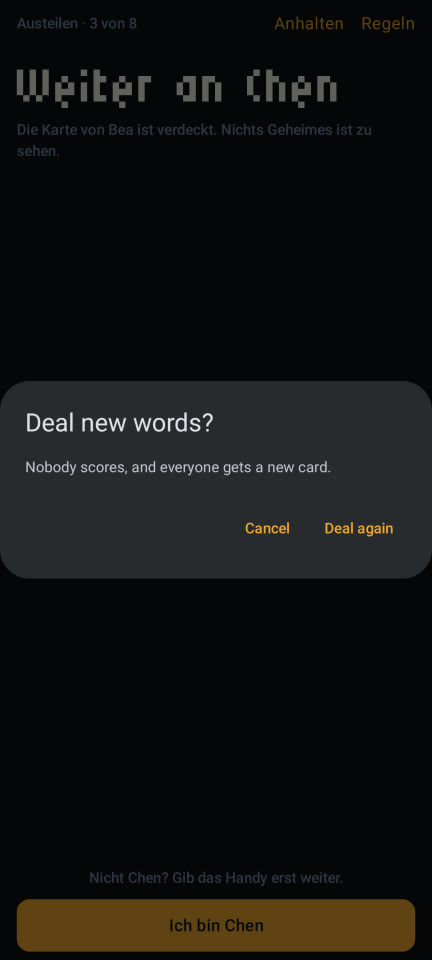
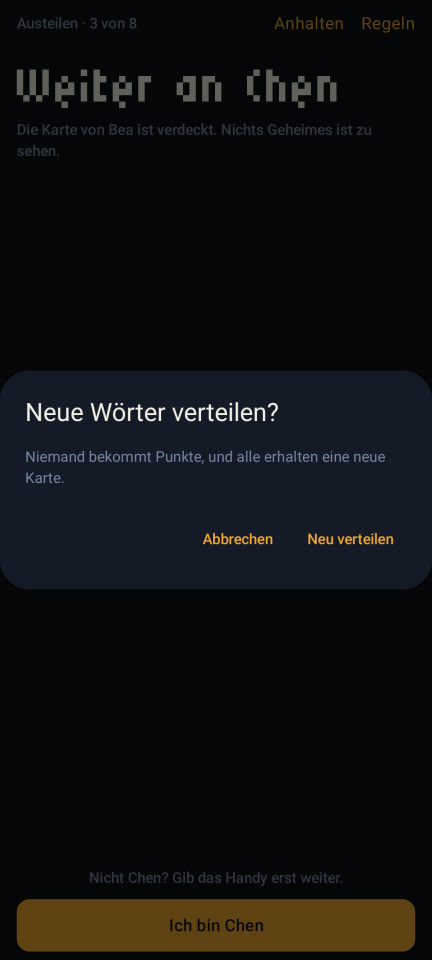
A Compose dialog is its own window, and its view takes LocalConfiguration fresh from the phone, so the locale the app's root sets never reaches it, and SkipUI resolves the alert's strings there. Text formatted before it reaches the alert comes out right, so every word of all 12 alerts is now a ready-made string in the UI language, Text(verbatim: model.string(…)). Menus too, since they're pop-up windows as well (reasoned, not seen: no fixture opens a menu). And the strings check now refuses a catalog Text inside an alert or a menu, so a catalog key written into an alert or a menu can't bring it back (a helper that returns a Text still could, and is kept out by hand).
"Без выбывания"
In the Russian Rules screen, the tie-break row lost both ends of "No elimination".



SwiftUI gives a segment at least its label's width. SkipUI's HStack gives every child the same share, and its ViewThatFits only checks the sum of the labels, so the row fit on paper and the widest label got cut. English "No elimination" lost 6 points too, just less visibly. SegmentedChoice now measures each label, and a segment whose label is wider than its share keeps its label's width. That takes a .frame(width:), since SkipUI caps even plain text at the share, and a fresh ForEach id, because SkipUI's containers remember that their content once filled the row.
The edge that never showed
When a list runs on under the buttons, a hairline marks the edge, so the buttons don't read as the end of the list. On Android it never appeared.
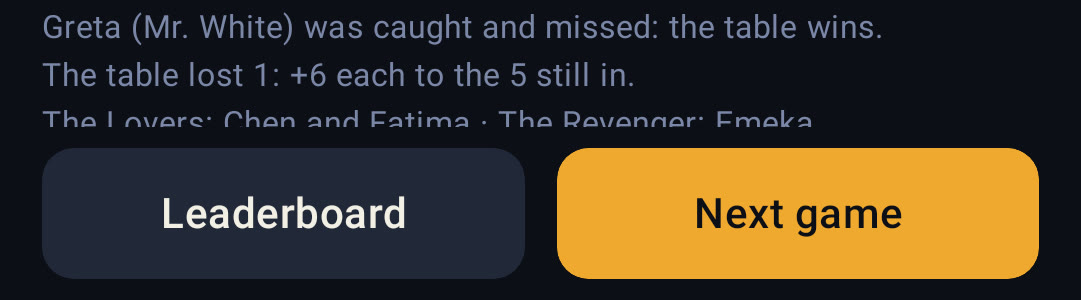
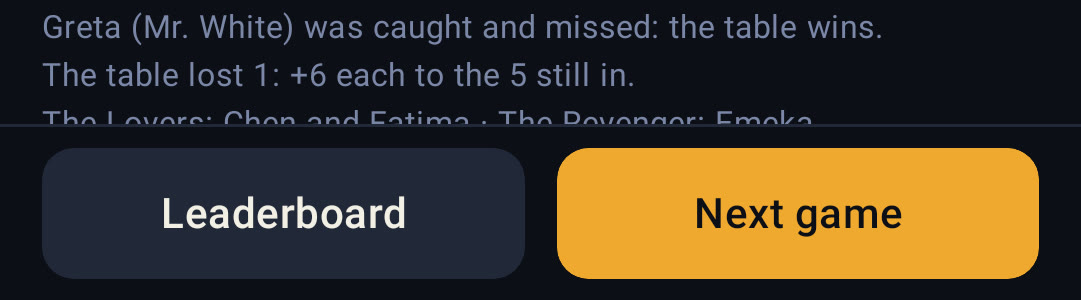
SkipUI builds onGeometryChange on Compose's boundsInRoot(), which clips a view's bounds to every ancestor. Inside a scroll view, the content never seems to end below the edge. Now a 1-point marker sits 12 points above the content's end and reports where it is, or that it has been clipped away, and the edge is drawn while the marker is at or below the bottom.
And a handful more
- The wallpaper's colours. On Android 12 and later SkipUI builds Material's colour scheme from the phone's wallpaper. On the JVM that meant Android 16's default palette: a navy knob on the switches' amber track, alerts on Material's grey (the "before" alert above). The Android shell now sets the scheme from the app's palette, with every text-on-colour pair tested for contrast.
- Tiny chevrons. SkipUI draws an SF Symbol as a Material icon in a box the size of the font, and the vote's arrows came out at about 4 × 8 dp. They're drawn strokes now, on both platforms.
- The cascade. When the Lovers go out together, their two cards floated alone and the line explaining why sat about 200 dp lower. SkipUI's
fixedSizemeasures the row but leaves it free to grow, and the cards filled it. Each card now measures itself, and the row takes the tallest. - The top row. "Round 2 · PK 1 of 2 · Turn 1 of 2" broke inside a part in German, Spanish and Russian ("Turno 1 de / 2"). Its first fix then broke a part between letters at Android's largest font size, which the render's
--font-scaleflag caught.


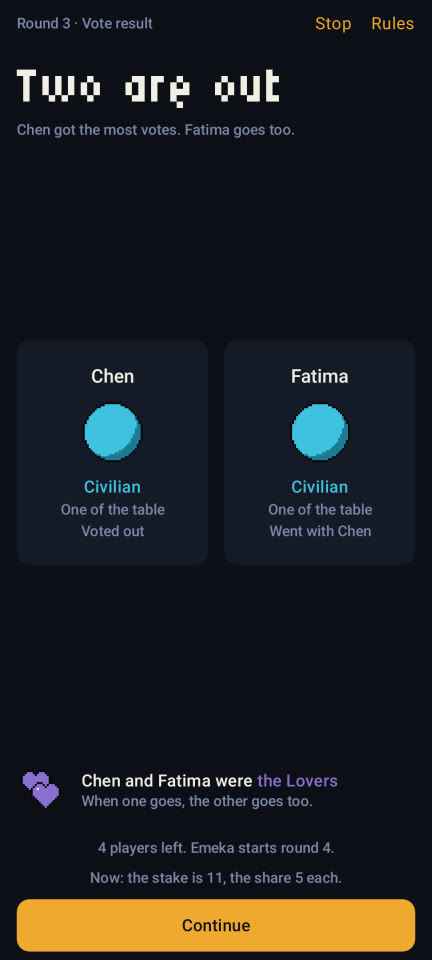
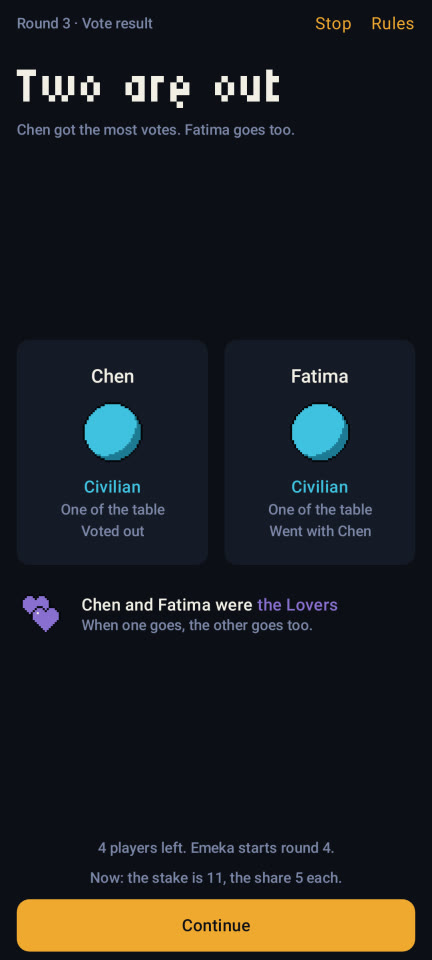
After the alerts, four reviewers went through all 456 pictures closely and found nine more faults. Eight are fixed, by six causes. As far as SkipUI's source can tell, every one is SkipUI and Compose doing what they'd do on a phone; the Robolectric quirks were the harness's own. After the fixes, 193 of the 456 pictures changed, each where a fix meant it to or by a sprite's frame.
A few things are waiting for me. The new chevrons change iOS too, so they need my eyes on an iPhone. And Mr. White's guess field (and the Players name field) sits 16 dp further in on Android, because SkipUI's text field keeps Material's own padding inside the app's. The fix needs either a platform condition in shared code, which needs my leave, or a shell-wide setting that would also strip the rename alert's field, so that one's my call.
The numbers
- 456 pictures (114 fixtures × 4 languages) in 2 min 19 s, about 130 s of it drawing: roughly 0.3 s a picture. English alone takes about 50 s.
- Byte-identical, run after run, on a quiet Mac: three runs of all 114 English pictures matched. With eight CPU burners on the eight cores, 1 of 114 still had a sprite one frame off (measured before the
@MainActorfix; not re-run under load since). - 1081 × 2401 px per picture: a Pixel 7 at
w412dp-h915dp-…-night-420dpi. Or a small phone (360 × 640 dp at xhdpi, 720 × 1280 px), the light theme, any font scale. - One Gradle build, a test JVM of about 1.9 GB, the daemon stopped afterwards.
- The stack: Robolectric 4.16.1, Roborazzi 1.76, AGP 9.2, Kotlin 2.3, Compose BOM 2026.05.01, JDK 26.
- Emulators booted for any of this: zero.
What it can't tell you
These are Robolectric renders on a Mac, not a phone, and here's what that leaves out:
- Text is drawn with the fonts of Robolectric's Android image (Roboto, Cyrillic included), but rasterised by the Mac's FreeType, so hinting can differ from a phone's by a pixel. A Samsung font is never seen.
- No system bars. No status bar, no navigation bar, no cutout, so the top bar sits at y = 0, where a phone puts it under the status bar.
- Shadows and blur may come out flat or missing. The app uses none of its own, but Material's alert has an elevation.
- No touch. No ripple, no pressed state, no keyboard, no TalkBack, and nothing vibrates. Only what a fixture opens gets drawn: menus, sheets and drags need a person.
- No real device. The Pixel 7 is a set of qualifiers, not a Pixel 7. The About screen proudly reads "robolectric · Android 16 (API 36)".
- Borrowed internals. The determinism reads kotlinx.coroutines' internals by reflection; if an update moves them, the render falls back on thread states and says so.
So Android is in a good place, and nobody has held it yet. The debug and release APKs build, every test passes as Swift and as Kotlin, and every screen a fixture opens renders. But no APK has been installed on anything. That's next, and that one needs a phone.
Since then the release build has run whole games on the emulator, and Halfword is out on Google Play.
Steal this
If your machine flinches at the emulator too, most of the recipe is in the code above. The one piece I've only described is the wait between main-thread tasks, and it took the longest to get right, so here it is, condensed. settle is what step calls:
/// Runs what is due on the main looper, one task at a time, laying out every window after each
/// and waiting for the coroutine pool to finish what the task started, until nothing is due.
private fun settle(looper: ShadowLooper) {
    var rounds = 0
    while (rounds < 10_000) {
        rounds += 1
        var waits = 0
        while (coroutinesBusy()) {
            if (waits == 20_000) { giveUp("the coroutine pool still busy after 2 s"); break }
            LockSupport.parkNanos(100_000L)
            waits += 1
        }
        layOut()                          // a layout can compose views, whose tasks start
        if (coroutinesBusy()) continue
        if (looper.isIdle) return
        looper.runOneTask()
    }
    giveUp("the main looper not idle after 10,000 rounds")   // the picture fails as "unsettled"
}
coroutinesBusy() asks the scheduler behind Dispatchers.Default (and IO, the same pool) whether a CPU permit is taken, a blocking task is running or a task is queued. It counts a task from the moment it's dispatched, before any worker wakes, which is exactly what the threads' states miss. It's kotlinx.coroutines 1.11's internal API, so it's read by reflection, once per process:
private object Pool {
    val read: (() -> Boolean)? = try {
        val dispatcher: Any = kotlinx.coroutines.Dispatchers.Default
        var type: Class<*>? = dispatcher.javaClass
        var field: java.lang.reflect.Field? = null
        while (type != null && field == null) {   // `coroutineScheduler`, somewhere up the class chain
            field = type.declaredFields.firstOrNull { it.name == "coroutineScheduler" }
            type = type.superclass
        }
        field!!.isAccessible = true
        val scheduler: Any = field.get(dispatcher)!!
        val kind = scheduler.javaClass
        val state = kind.getDeclaredField("controlState\$volatile").also { it.isAccessible = true }
        val blockingMask = kind.getDeclaredField("BLOCKING_MASK").also { it.isAccessible = true }.getLong(null)
        val blockingShift = kind.getDeclaredField("BLOCKING_SHIFT").also { it.isAccessible = true }.getInt(null)
        val core = kind.getField("corePoolSize").getInt(scheduler)
        val available = kind.getMethod("availableCpuPermits", java.lang.Long.TYPE)
        val queues = listOf(kind.getField("globalCpuQueue").get(scheduler)!!,
                            kind.getField("globalBlockingQueue").get(scheduler)!!)
        val size = queues[0].javaClass.superclass.getMethod("getSize")
        val reader: () -> Boolean = {
            val now = state.getLong(scheduler)
            val running = core - (available.invoke(scheduler, now) as Int)
            val blocking = (now and blockingMask) shr blockingShift
            running > 0 || blocking > 0L || queues.any { (size.invoke(it) as Int) > 0 }
        }
        reader()   // fail here, not halfway through a render, if an update moved something
        reader
    } catch (_: Throwable) {
        null       // then fall back on the worker threads' states, and say so in the log
    }
}
The short version:
- Give your debug build a way to open any screen from a file, and to say when it's up.
- Write one Robolectric test with
@GraphicsMode(NATIVE)that starts your real activity, once per screen, and saves it with Roborazzi'scaptureScreenRoboImage. - Move the clock yourself, one main-thread task at a time, lay out every window as you go, and wait for the coroutine pool between tasks. Throw away one warm-up render first: the first activity of a process is slow enough to put a sprite a frame late.
- Fail any picture you can't vouch for.
- Look at the pictures. Nearly every bug above was found by looking at one, not by a diff.
And the store screenshots
The fixtures earn their keep twice: the store screenshots come from them too, for both stores, made by scripts rather than by me with a phone.
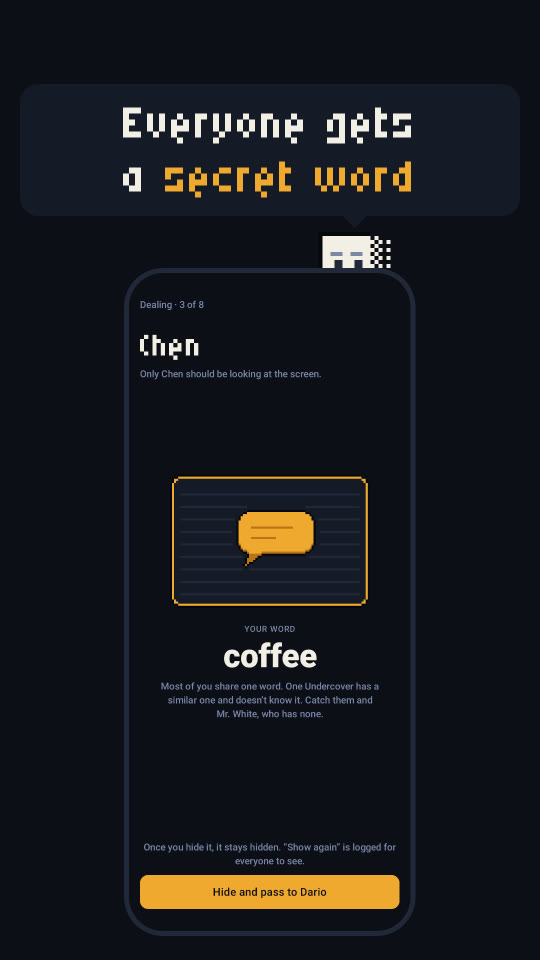
App Store. A script builds the Debug app (a release build ignores fixtures), boots one pinned simulator and, for each of ten fixtures, launches the app with HALFWORD_FIXTURE and HALFWORD_LANG set, waits for its ready file, sets the status bar to 9:41 and takes the shot. A Python script then frames each one: the Half stands on the phone's rim at 10× and says a caption in a speech bubble like the one on Home, in Micro 5, or in a heavy system font where Micro 5 has no letters (Russian, Ukrainian). Headless Chrome draws the frames at exactly 1320 × 2868, the size App Store Connect scales down for every smaller iPhone, and fastlane's deliver uploads them, one at a time, because App Store Connect chokes on parallel uploads to one version.
Google Play. Same fixtures, no simulator: the render from this post draws eight of them in six languages, and the same script frames them at 1080 × 1920. That size isn't a choice. Play refuses a screenshot with one side more than twice the other, and the Pixel 7's 1081 × 2401 is longer than that, so the frame is 9:16, with the Half at 8× and Micro 5 at 12 px a font pixel. The JVM render has no status bar, so the frame gives the screen 24 dp of ink at the top and bottom, where a phone keeps its bars. Then fastlane's supply uploads the set, from lanes that only know Play's internal and closed testing tracks: production stays a button in Play Console.
A stale set can't go up. Once, a set of App Store screenshots came from a Debug build left over from before a rules change: the old titles, and one picture that said "Fixture failed". So every set is now stamped with a hash of the sources it was drawn from, the upload lanes refuse a set whose hash isn't the checkout's, and a run deletes the old set before it starts, so a failed run leaves nothing behind to upload.
That's it
The render still doesn't need the emulator. My Mac draws Halfword's Android screens in the time it takes to make a coffee, in four languages, the same pixels every time it's left alone. And "Без выбывания" fits.