On 25 October eleven of us raced indoor karts at the Rennring in Magdeburg. Five minutes of quali, twenty minutes of race. I took pole and led all 26 laps, so obviously this needed to be on video.
Five cameras were running: my DJI on the kart, my girlfriend's iPhone on the balcony, a couple of friends' phones, a GoPro and an Insta360 somebody brought along. 22 GB, recorded however people felt like it.
I didn't want a vlog. I wanted the real thing: an F1 TV broadcast, the timing tower always on, my onboard in picture-in-picture, replays, race control messages, team radio and a commentary box. I don't edit video for a living, and the editor I have is free DaVinci Resolve, which can't be scripted. So the plan was simple: everything that can be code becomes code. Claude (Claude Code) writes most of it. I decide, log and watch.
Three weeks later I had a 23-minute 1080p broadcast in five parts, with 239 lines of commentary and 8 real team radios. This post isn't about the race. It's about how the work was organised, because most of it would work for any editing project you'd want to hand to an AI.
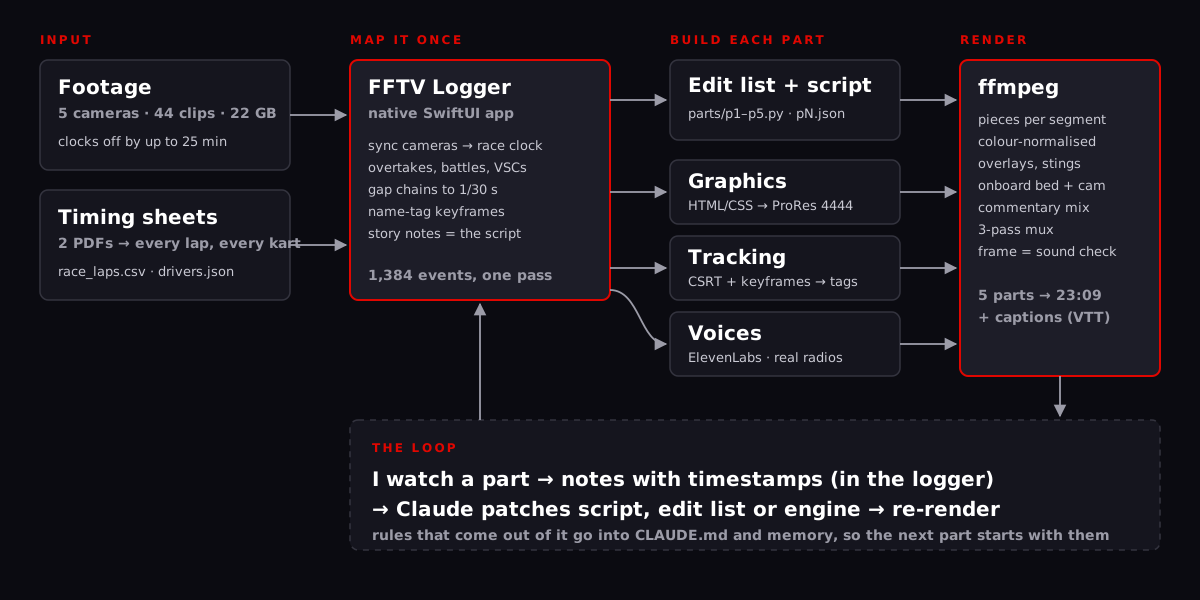
Before any code: a brief that survives
The whole project ran in one long Claude Code session, which got compacted (summarised to free up context) eight times. The chat was never what held it together. A file did: CLAUDE.md in the repo. Claude reads it at the start of every session and updates it every time something gets decided.
Three parts of it did most of the work.
Founding principles. They were written before the first line of the logger, and every argument afterwards was settled by them:
- Nobody watches the footage twice. One logging pass has to capture everything the edit, the sync and the script will need. So the tool saves every keystroke immediately, and it has to work the first time.
- The log is the story. Logging produces the event map and the narrative notes, and the notes become the commentary script.
- Disk space on the Mac is tight. Native tools, no dependency trees left lying around, caches deleted, throwaway virtualenvs.
Facts you must not get wrong. Cheap to write down, expensive to get wrong in a render. My tower code is IWA, but the commentary calls me Mik and pronounces IWA as "Eewa". FAB's name is German and has to be said that way. One driver goes by a nickname that isn't on the timing sheet. Race 0:00 is the timing clock's zero, not lights out, which is five seconds earlier. Nobody at the track knew blue flags, so a lapping is just a fight for position. The karts are colour-coded after F1 teams, but the teams are only colours: no brand name is ever said or printed.
Memory for rules that bit once. When I had to correct the same kind of thing twice, it became a short note Claude keeps outside the repo. "An overtake is logged as the order after the pass, a battle as the order when it starts." "Spread the replays out, the late race is thin." "On my site, open the PR and send me the preview link, I merge." Eight of those by the end.
You notice the difference. Once the brief and the notes existed, a compaction in the middle of planning a render cost nothing. Before that I'd have been explaining the race clock all over again.
1. Define the problem, then build the tool for it
The real problem with this footage wasn't cutting it. It was knowing what is where. Five cameras on five clocks, karts that all look the same from a balcony, and a timing sheet that knows every line crossing to the millisecond and nothing about what happened in between.
Ingest first
Before anyone watched anything, Claude went through every file: resolution, frame rate, creation time, and how far each camera's clock could be trusted. The phones were network-synced. The GoPro had real UTC. The Insta360 exports had no clock at all, only the time they were exported. My DJI turned out to be about 25 minutes slow. Claude pinned it on the one thing I knew for sure (lights out is in clip 0032, between 4:55 and 4:56) and chained its 6:07 chunks by duration.
The ingest also wrote a guide page: a timeline of which camera covers which minutes of the race, contact sheets, and a plan for logging.
The logger
Then came the tool itself. FFTV Logger is a native macOS app in SwiftUI with no dependencies, built with swiftc from a shell script. You open one folder, every clip is listed by camera clock, and there's a key for everything:
- S line crossing, O overtake, B battle, I incident, F stewards' case, V VSC, R reaction, M meme moment, C comment.
- G gap chain: on a static camera you mark each kart's nose passing the same spot, and you get gaps to the frame (1/30 s). That beats guessing.
- Q/E rotate the picture from that frame on, because my DJI mount slipped and I didn't want to watch half the race with my head tilted.
- T tag the karts on a paused frame, for the name tags later.
Every key pauses the video and opens a prompt under the picture, not over it, because the frozen frame is exactly what you need to see who's where. You get driver chips in the current running order, a 1–3 rating, a flag for the highlights cut, and a comment.
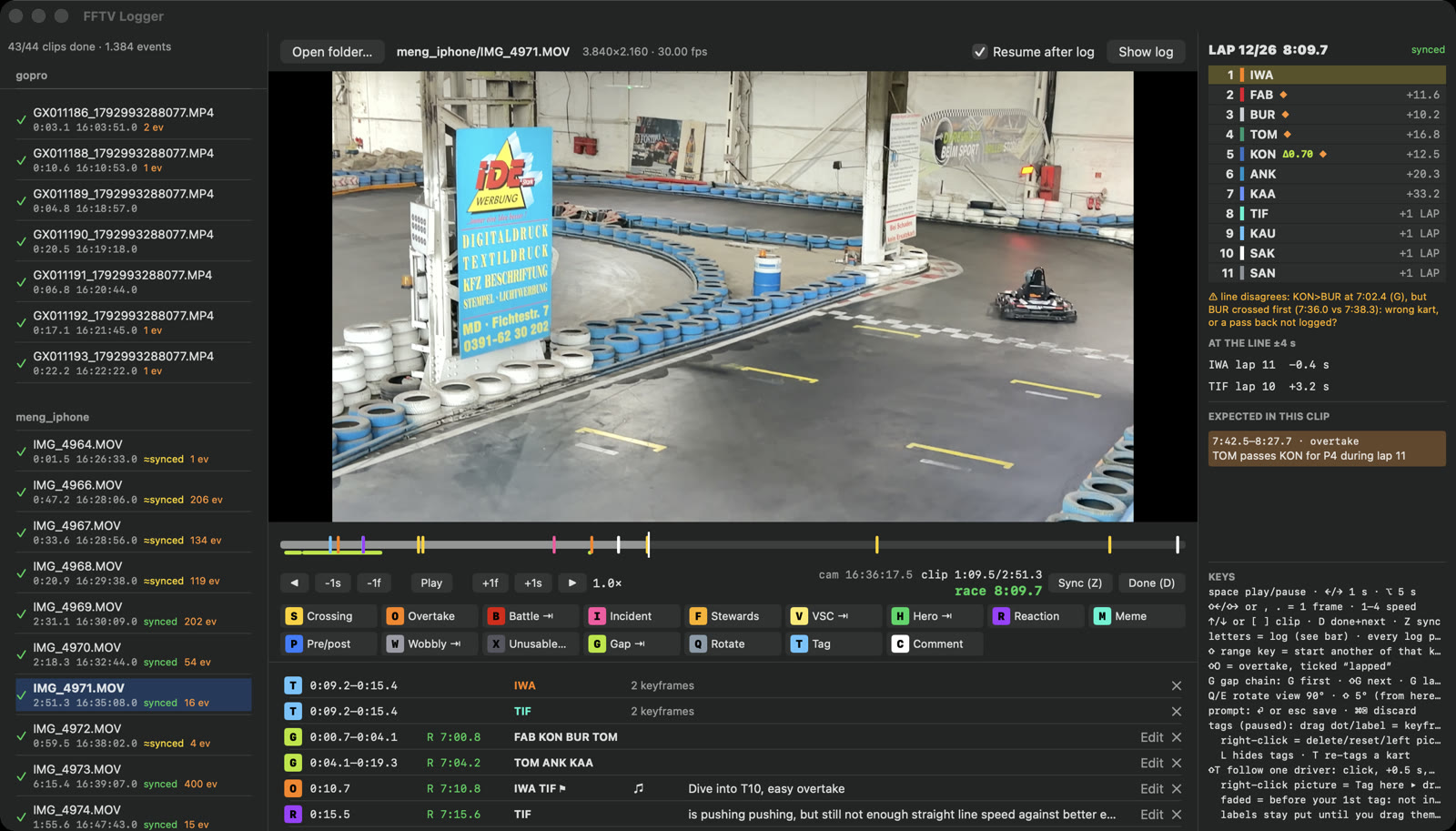
What made it worth building is the right-hand panel. The logger knows the timing sheet, so it shows a live tower at the clip's race time, in running order: the sheet's order, plus the overtakes I'd logged that the line hadn't seen yet. It shows who crosses the line in the next few seconds. It predicts what to expect in the clip from the lap times (a slow lap, a position change). And when the next crossings contradict a pass I logged, it says so, which almost always meant I'd mixed up two karts.
Syncing a camera is one key. Press S on a crossing, pick "FAB lap 7" from the suggestions, and the whole camera folder is synced through the clock differences between its clips.
The data argues back
The timing sheet and my eyes disagreed twice, and both times it mattered.
First, I logged myself lapping SAN at 3:40, and the sheet had nobody anywhere near there at that time. It turned out the sheet times each kart's first lap from its own first crossing of the line, not from the start. Claude fitted a start delay per kart from my gap chains and crossings: 0.75 s for FAB up to 6.2 s for SAN at the back of the grid. After that, my crossings matched the data within 0.4 s instead of 6.
Second, for laps 7 to 10 the sheet had BUR ahead of FAB, and he wasn't. So the rule became: where my log disagrees with the sheet, the log wins. The edit has a span for exactly that.
Logging took a few evenings: 1,384 events, 1,164 of them tag keyframes. And the logger turned out to be the review tool too. Once a part was rendered, I opened the render folder in the same app and left comments with timestamps. Claude read them straight from the log: twenty notes on part one, eight on part two, nothing retyped.
2. Graphics as code
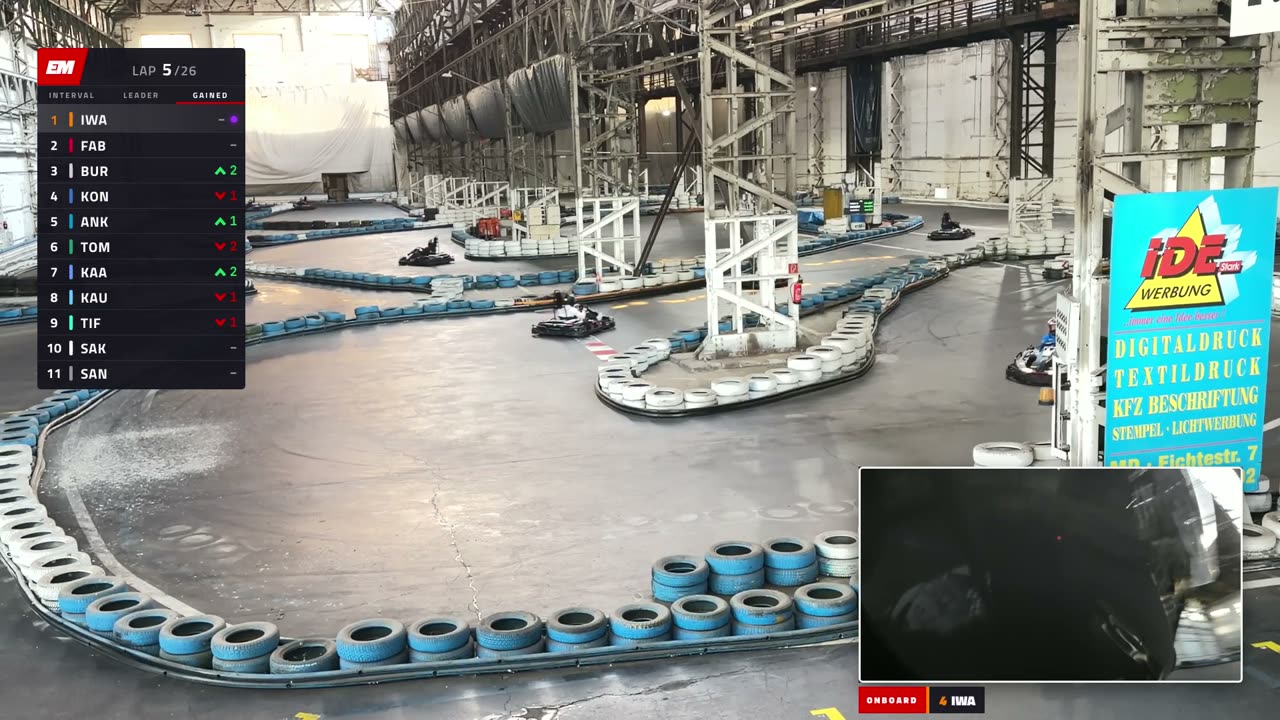
The look is F1 TV, one to one, with its own mark: EM, a red box with the letters, both slanted forward. Titillium Web for text, JetBrains Mono for numbers. Purple is for the fastest lap only, yellow for VSC, amber for an investigation, red for the brand and penalties.
Every graphic is an HTML/CSS component: the tower, banners, battle and overtake cards, race control, team radio, fastest lap, lower thirds, stings, the starting grid, the classification. 21 of them, in about a thousand lines. The trick is how they get rendered:
- A page loads the component, a
seek(ms)call freezes every CSS animation at that moment, and Playwright takes a screenshot with a transparent background. - The frames go into ffmpeg as ProRes 4444 with alpha: a full 1920×1080 frame that sits on top of the picture without any positioning.
- Every graphic animates in for about half a second and out for about a third. The sting covers the screen from 0.45 s until 0.45 s before its end, so a cut can go anywhere in between.
- One data file,
drivers.json, feeds them all: codes, kart numbers, colours, classification. That's what makes it reusable for the next race.
The tower is the one graphic that changes every frame. It's a job with properties per frame, computed from the race clock (positions, gaps, interval or leader mode), so it keeps up with the footage even when a segment is sped up. Identical frames reuse the previous screenshot, which is the only reason a four-minute tower doesn't take forever.
Halfway through I wanted position changes to be "louder", like on F1 TV. Now every change flashes for four seconds: the position cell lights up green or red, the row gets a wash, and a chevron with the number of places appears next to the code. A third tab, GAINED, shows places won or lost since the grid, under the "if you've just joined us" recaps.
Two things about doing design this way:
- Taste goes into the data, not the chat. The first driver cards came back with my card taking 80% of the space and the others 30–40%, plus a few mean nicknames. Instead of fixing cards one by one, it became a rule: every card is scaled by the size of the head, measured from the photo. BUR got a nickname I actually liked, "the Minister of Defence": I spent five laps behind him and never got past.
- Kart numbers are design too. The first version used the grid slot. Now every kart has a real F1 number from its colour's team (ANK drives in Alpine colours, so 43). That rule lives in the brief, so the graphics never drifted apart.
The repo has a live style guide with every component on a test card. Whenever a graphic changed, that page was the first thing to check.
3. ffmpeg is the editor
Since Resolve can't be scripted, the original plan was to generate a timeline for it as FCPXML. In the end ffmpeg did the whole edit, and Resolve never opened.
Edit lists in Python
The race is split into five parts of about five minutes. Each part is an edit list in Python, a list of segments, each one a piece of some camera clip:
- live: a span of the race clock from one camera, at most 1.2× speed. Anything faster stops looking like a broadcast and starts looking like an edit.
- replay: a span of a clip, played into a hole in the race clock of exactly that length.
- vt: pre- and post-race footage, with no race clock.
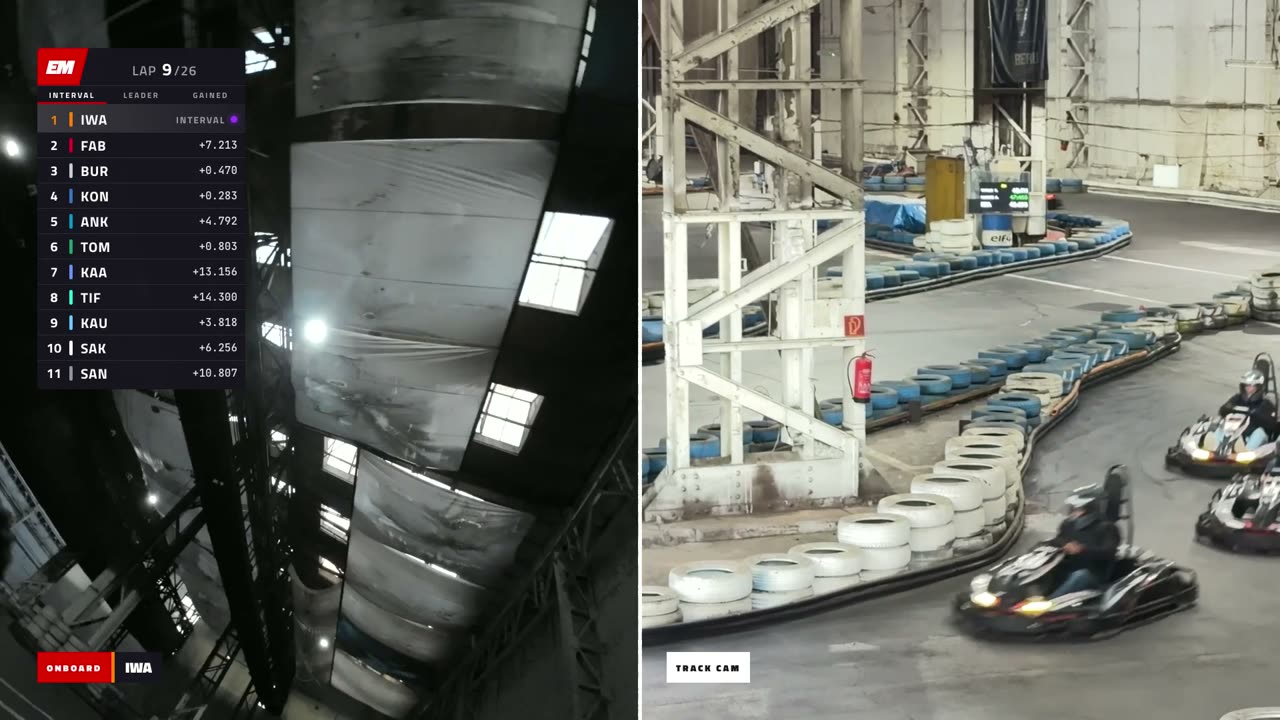
- Layouts: full frame, portrait (with blurred side bands), split with my onboard, onboard only, black. The onboard can be picture-in-picture or sit inside the tower.
The broadcast rules came out of my notes on the first demo and were written down once. The race clock never jumps backwards. Holes get filled with replays. Every jump is covered by a sting. And a vertical phone video never gets shown with huge black borders when the onboard can fill the other half of a split.
Pieces, then one mux
demo.py --part p3 does four things. It renders the graphics that changed, renders one video piece per segment (in parallel, on the hardware encoder), places the voices, and muxes. The mux runs in three passes (picture, sound, both), and the last step is a hard check: the frame count has to match the planned length and the sound has to be as long as the picture. Otherwise it refuses to finish.
That check exists because of the worst evening of the project. The first render of part one had music that broke off at 0:28, a few freezes, a commentator saying "Mik completes the opening lap" before the lights had even gone out, the tower gone but the picture-in-picture still there, and no sound after 4:00. My review started with "complete and utter bullshit". It was.
The cause was nasty. The opening montage mixed clips from five cameras with different colour tags, and every time the tag changed, ffmpeg rebuilt its filter chain mid-stream and restarted the overlay timing. About 500 frames disappeared and everything after them drifted. The fix: normalise every piece to the same colour space, renumber the frames by index, and add that check. It never happened again. Claude hadn't actually looked at the output before handing it over, which in hindsight is the real failure. Since then every render comes with a frame count and a list of what wasn't checked. Listening is always my job anyway.
Sound
The footage's own audio is mostly friends chatting on the balcony, so it's not used, with two exceptions. My onboard is the ambient bed under the whole broadcast: normal when it's the picture, quiet in picture-in-picture and replays, ducked under the commentary. The track camera's sound comes in as a second, heavily filtered layer while that camera is on screen. Every cut gets a 10 ms fade, so the joins don't click.
The opening runs on the F1 TV theme: 39.5 seconds of quick cuts on its first 16 bars, then a jump to the calm section for the starting grid. Claude mapped the track's beats (99.9 BPM) to land the cut on a downbeat, and I still heard a stitch, twice. What finally worked was letting the first section ring through its own downbeat, which doubles the hit of the second one, and fading it out underneath over 0.6 s.
Caches, and the black GPDA cut
A full part takes about six minutes, a sound-only remux two and a half, and the last run of all five parts about an hour. That's only bearable with caches: graphics re-render only when their job or the CSS changed, and the pieces are kept between runs.
Caches are also where the sneakiest bug lived. Pieces were cached by name and start frame. When I asked for one segment to show a replay instead of a black title card, its name and start stayed the same, so the old black piece came right back. It got caught on a frame check just before the final cut was joined. Now the cache remembers each segment's definition and re-renders a piece when it changes.
4. Object tracking, where it pays
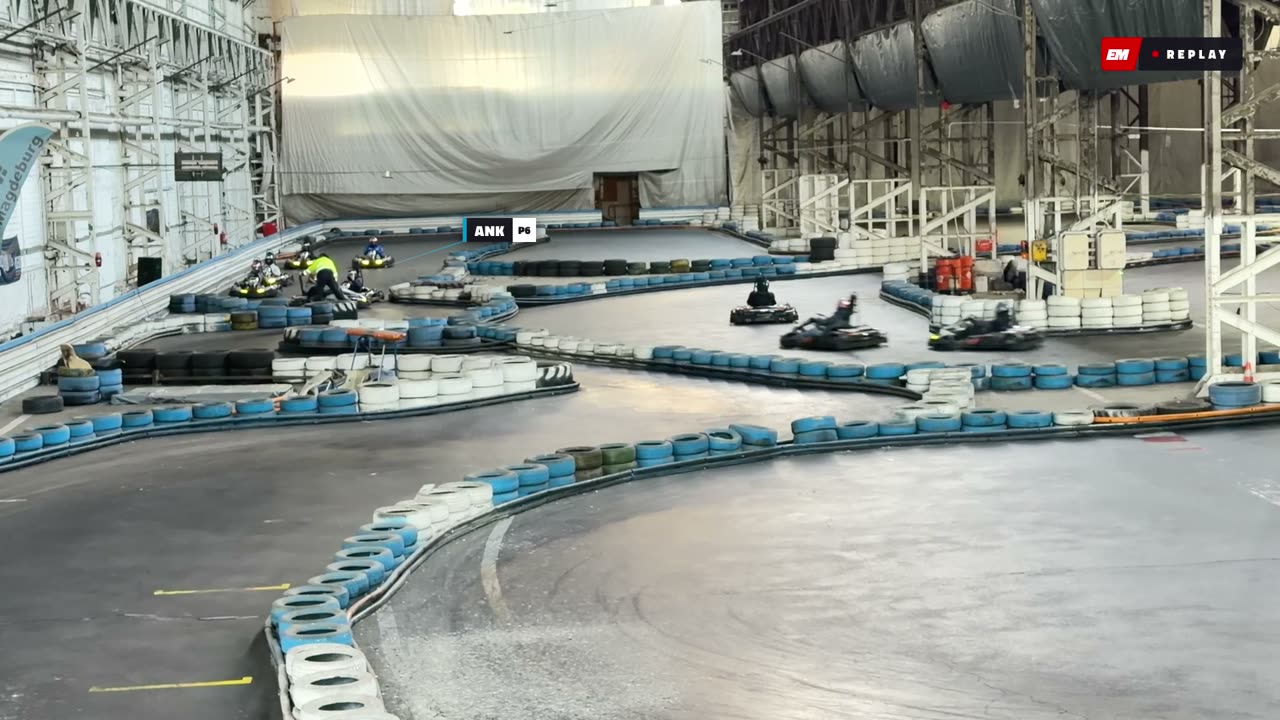
Name tags on the karts are what make a balcony shot readable. They're also the most expensive part of the project, so it's worth deciding where you actually need them. Where I ended up: none on the live start (it runs clean), tags in replays, and live only on wide shots, for the two or three karts the story is about. Incidents run untagged live and tagged in the replay.
Keyframes from a human
In the logger, T tags the karts on a paused frame, and Shift-T follows one driver: click his kart, the video moves half a second on, click again. Dragging the dot moves the anchor (where the tag points, say the kart's nose). Dragging the label moves the label, so it doesn't cover an apex. Between keyframes up to 8 seconds apart, the tag moves on its own.
The tracker fills the gaps
track.py runs OpenCV's CSRT tracker between each pair of keyframes, forward from the first and backward from the second. It also measures the camera's own pan from background features, so it knows where each point is in the world. A pass that lands near the other keyframe is trusted. A pass that doesn't gets cut where it goes still in the world, which is what a tracker does when it latches onto a wall or a banner instead of the kart, and the gap is inferred. The renders and the logger follow the same rules: tagpath.py mirrors the logger's Swift code and has to be kept in step with it.
The first version took over 8 minutes for a 10-second stretch: it tracked every point across the whole span in both directions, on portrait frames that took 5.6 GB of memory. Smaller frames, hardware decoding and tracking only between keyframes brought that down to 40 seconds. Still, in the end I clicked faster than OpenCV tracked, and I said so. The tracker became a gap filler and my clicks were the truth. It also can't tell karts apart: in the first demo it swapped TIF and KAU, and from then on I never let it guess who's who.
Labels that don't hide the race
On vertical phone footage the labels landed right on top of the action. Now, on a portrait source, they live in the blurred side bands, with stems pointing in at the karts.
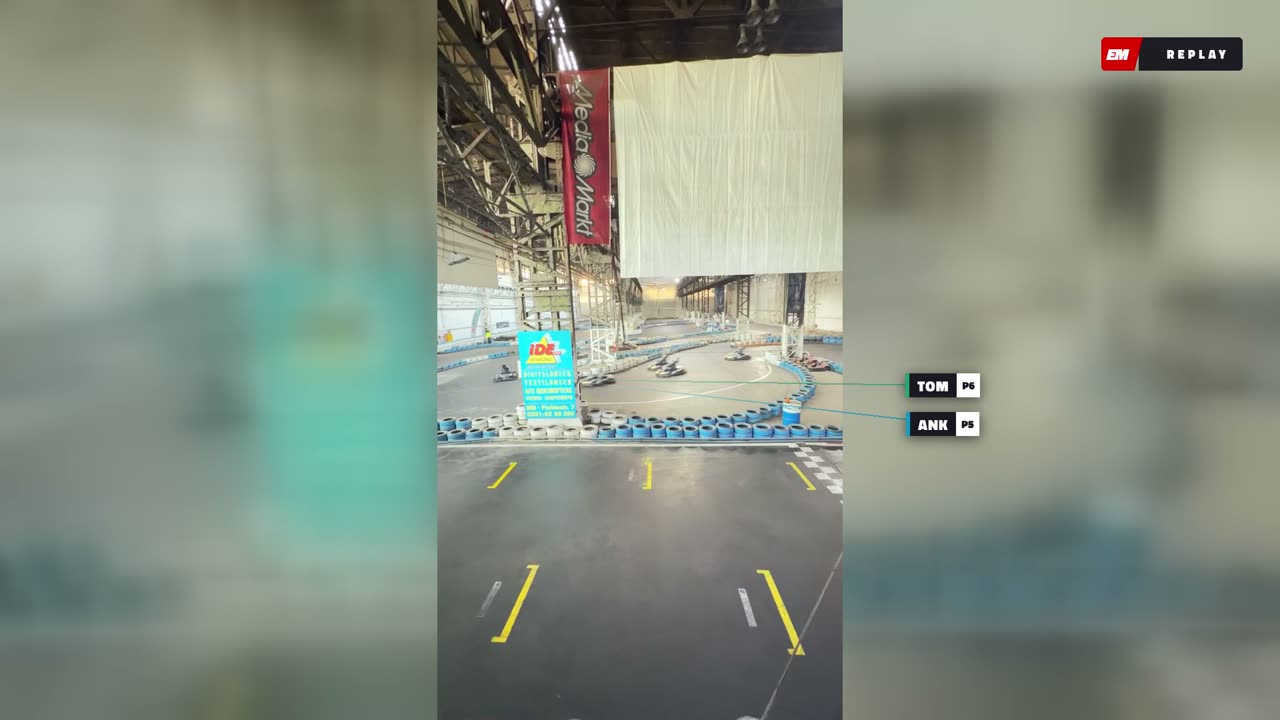
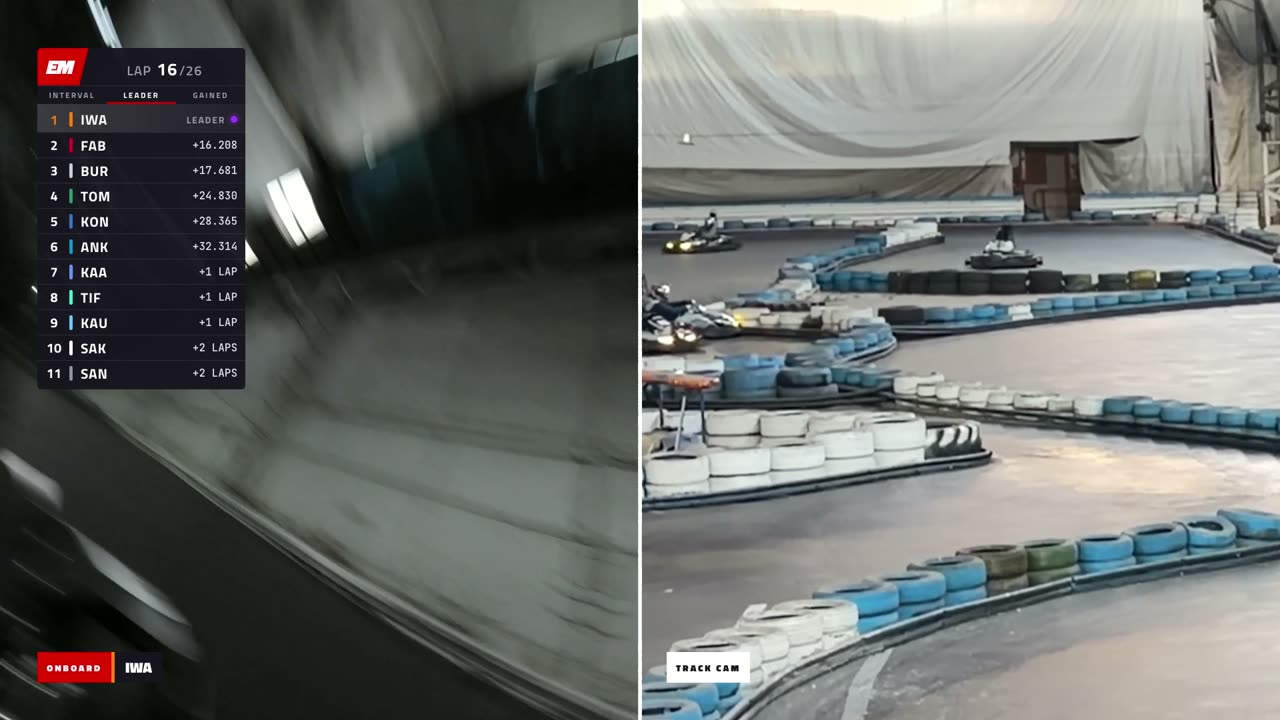
Same idea for the zooms. The lap-16 pile-up in the esses happened right under where the tower sits, so that bit became a split with the onboard, plus a zoom that pans along with the camera. The first version cut straight to the zoom and panned over before anyone had said a word, as if the camera operator knew before the commentators. The final order: the commentators notice BUR catching TIF, a few seconds later the camera pans over, and only then do they touch.
5. The commentary box, and everything else
Voices
The broadcast has a three-person box modelled on F1 TV's: a lead commentator, an analyst for lines and penalties, and a chatty ex-driver who notices things. The lines are made with ElevenLabs. A script line looks like this:
{ "at": 853.25, "who": "LEAD", "hit": "Oh", "text": "[shocked] Oh! KON has hit BUR! He's spun right round!" }
at is a race time, or a segment plus seconds, or "+0.2" (after whoever is talking finishes; negative means cross-talk). hit puts that word, not the start of the line, on the moment, using the timestamps ElevenLabs returns with the audio. stop cuts a line off when the next one comes in, over puts a reaction exactly on its moment, and radio turns the line into team radio with its card. A plan mode times the whole script from word counts before a single credit gets spent, and takes are cached by text and voice, so only changed lines cost anything.
The hard part wasn't the voices, it was sounding human. Real commentators don't talk in one-liners. Somebody carries a thought over a few sentences, somebody else cuts in ("sorry, just saw that"), the first one picks it back up, and there are ums and false starts everywhere. Then the calls had to land on the action. Claude was guessing where on the lap I was and was up to eight seconds off. The fix was ground truth from me, a corner map (turn 3 is five seconds after my line crossing, turn 9 thirty, and so on), plus those hit words. The very last fix of the project was one of these: the lead's "Oh!" came a second before KON hit BUR.
Team radio
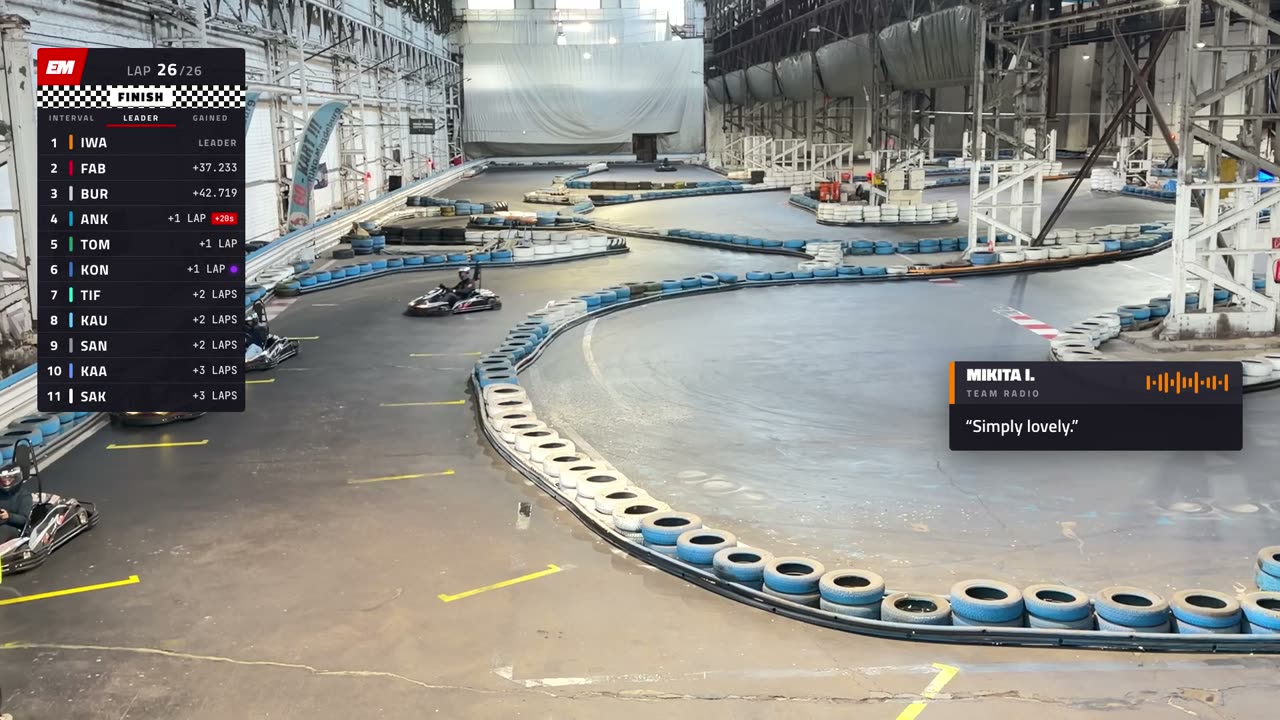
I wanted ten to fifteen radio moments, each a famous real F1 radio line on one of our moments. The first round was revoiced by AI and sounded exactly like it, so real clips won. One clip turned out to be fake, so I dug up the real recording myself.
Stewards
The lap-16 queue jump became a storyline: race control cards at broadcast time (noted, under investigation, decision), a +20 s penalty that drops ANK from fourth to sixth, a PEN badge in the classification, and a statement from the drivers' association in my own cloned voice, written to sound PR-trained but not quite GR-trained. BUR's badge says NEVER PASSED: the sheet has him a lap down, but on track I never got by him.
Captions and publishing
At the end Claude built English captions (308 cues) from the exact time each line was placed, and cleared 24 GB of renders and caches so the footage folder could go to the drive. The race went up as an unlisted post here. The one time it overstepped was there: I said "publish it" and Claude merged the pull request instead of sending me the preview link. That's a memory note now.
How to organise the work
If I did it again, here's what I'd keep.
- Build the logging tool before touching the edit. One pass over the footage, saved on every key, with the data inside the tool (the timing sheet, here), so it can argue with you while you log.
- Write the brief down and keep it current. Principles to settle arguments, facts that must not be wrong, short rules for every mistake that happened twice. Long sessions get compacted. Files don't.
- Split the work by who can actually see. I identified karts, judged taste and pacing, and listened. Claude measured: clock offsets, start delays, VSC windows from lap times, checklists like "go to clip 4973 at 0:24, tag these three". Each side caught the other's mistakes.
- Review in the same tool, with timestamps. Notes left on the render in the logger were precise and never needed retyping.
- Make the pipeline refuse to lie. Frame and sound counts must match the plan. A self-test drives the logger's real UI with fake key presses. Every render report says what wasn't checked.
- Make expensive steps opt-in. A plan mode before spending credits, caches with honest keys, and no full re-render until I ask for the whole thing.
- Let it decide, but ask before the irreversible. Most calls Claude made on its own and flagged. It stopped to ask before rewriting the timing data, downloads and deleting things. That kept the loop fast.
- One part at a time. Five minutes of broadcast per round, each with its own notes, and the rules from part one carried over into part two.
| In numbers | |
|---|---|
| Footage | 5 cameras, 44 clips, 22 GB |
| Logged | 1,384 events, 1,164 of them tag keyframes |
| Code | ~2,600 lines of Swift (logger), ~2,200 of Python (pipeline), ~1,000 of JS/CSS (graphics) |
| Broadcast | 5 parts, 23:09, 41,675 frames, 239 commentary lines, 8 real radios |
| Calendar | race 25 Oct, logger 27 Oct, first demo 29 Oct, final cut 9 Nov |
The tooling (logger, graphics engine, pipeline) is on GitHub as fftv, without the race footage. Next race, the driver file changes and the rest stays.